Tutorial
List a group of young
List young you've bred, from planned to gone home, with each animal, its price and its status.
A group of young is for animals you've bred and place one by one. Your menu names it after the animals you raise (for example clutches or litters). Buyers can follow a group from the moment it's planned.
Create the group
- In the dashboard menu, open the first entry under Animals and listings and choose New.
- Choose the species, and the pairing it comes from if you keep breeding records. With a pairing, buyers can see the family tree (tick Show the family tree on the listing; parents you keep private stay hidden).
- Choose the Status: planned, expected, arrived (named for your animals), available, or closed.
- Fill in the Dates: when you expect them, when they arrived, and when they're ready to go home.
- Set How many and a Price from and Price up to, and a Deposit if you take one.
- Choose How buyers contact you: inquiries or applications, and which Request form to use (Automatic uses your most specific default).
- Add a description and photos, then create it.
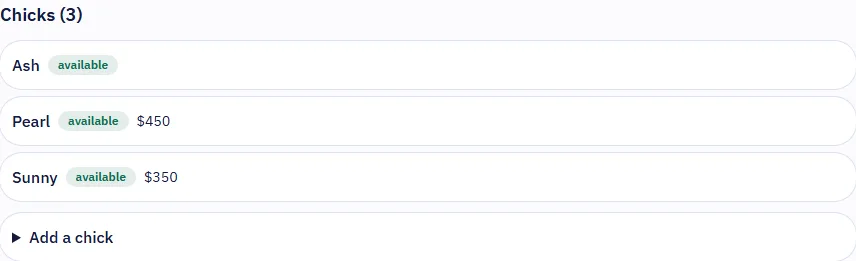
Add each animal
On the group's page, add each animal with a name or label, its sex, its price (blank uses the group's price) and photos. Each one has a status:
- Available: buyers can ask about it.
- Reserved: promised to someone.
- Gone home: placed with its buyer. PerfectPal checks the go-home age before allowing this.
- Not available: you're keeping it, or it can't be sold.
An animal reserved for a matched request follows that request: see I can't change an animal's status.
Add photos in bulk uploads a batch and lets you choose, photo by photo, whether it goes on the whole group or on one animal.
Keep reserved buyers posted
Updates for reserved buyers on the group's page lets you post photos and news that only buyers with a reservation see.
When everyone's gone home
Set the group to Closed (hidden from buyers). If requests are still open, PerfectPal offers to decline them all with one message. See Close or delete a listing.
Updated October 19, 2026
Was this helpful?
Still need help?
PerfectPal staff read every message. Tell us what you were trying to do and what happened.
- Buy now, inquiry or application?The three ways buyers can reach you from a listing, and what each one switches on.
- Photos and videos on listingsHow many you can add, what happens to them, and how videos are converted.
- Quantity, stock and editing many listingsHow quantity drives availability, what buyers see during checkout, and how to edit or import many listings at once.
- "Still available?" emails and paused listingsWhy PerfectPal asks whether an untouched listing is still available, and what happens if you don't answer.
- Close or delete a listingWhat happens to open requests when a listing closes, an animal goes, or a listing is deleted, and when an animal comes back.