Tutorial
Connect your own domain
Show your PerfectPal page at your own web address, like www.yourname.com, with two DNS records.
You can show your PerfectPal page at your own address, like www.yourname.com. Visitors still see the PerfectPal bar and your trust details, and signing in and paying always happen on PerfectPal.
Only the account owner can set this up, and whether you can depends on your plan. If the page says custom domains aren't available yet, PerfectPal hasn't switched them on.
Before you start
You need a domain you've bought from a registrar (GoDaddy, Namecheap, Cloudflare and so on), and the sign-in for where its DNS is managed.
We recommend the www version (www.yourname.com): it works the same way at every DNS provider. People who type yourname.com can be sent there.
Step 1: your domain
- Open Your page › Your domain.
- Enter the domain, for example
www.yourname.com, and choose Continue.
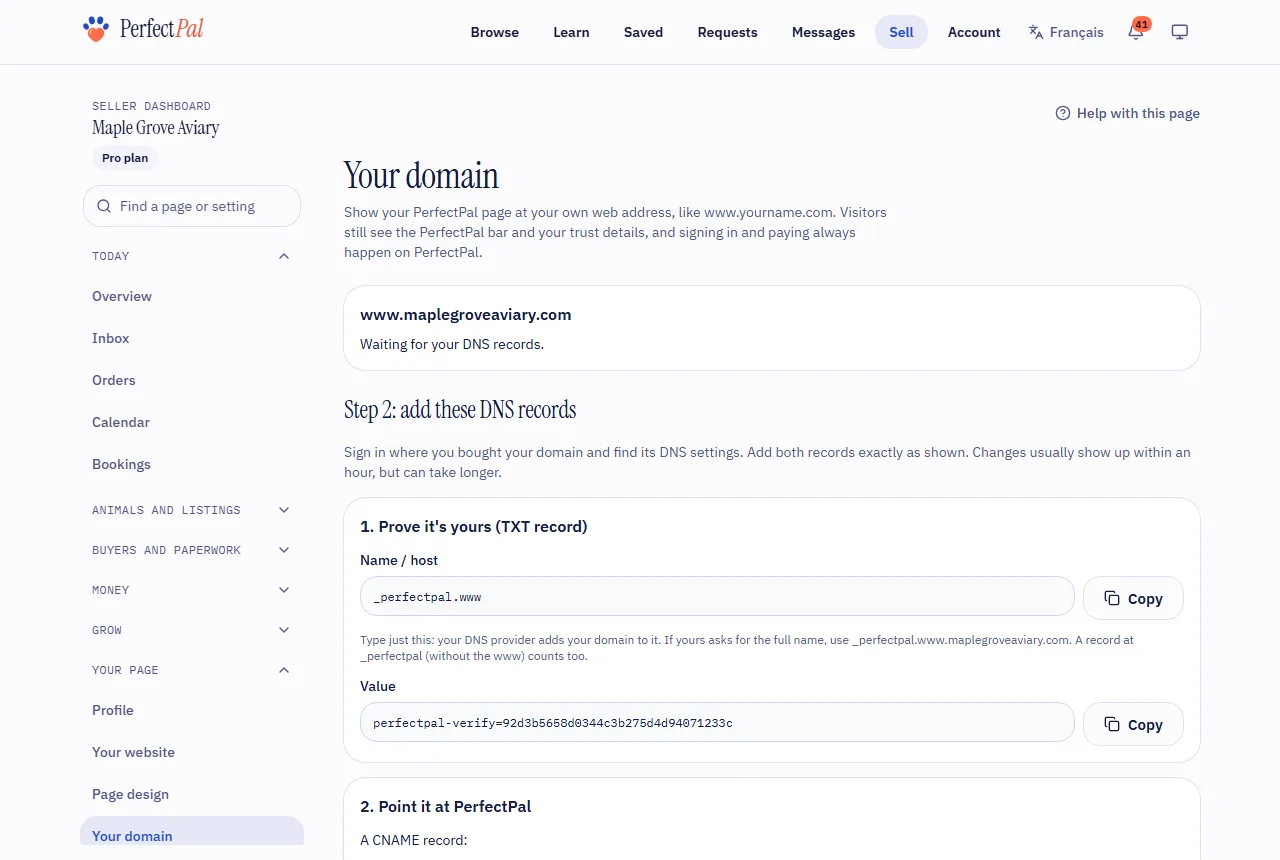
Step 2: add the DNS records
Sign in where you bought your domain and find its DNS settings. Add both records exactly as the page shows them:
- Prove it's yours (TXT record): the name starts with
_perfectpal, and the value is a code unique to you. Type just the name shown: your DNS provider adds your domain to it. (Forwww.yourname.com, a TXT record at_perfectpalwithout the www counts too.) - Point it at PerfectPal (CNAME record): the name is
wwwand it points to the address the page shows.
Leave any other records (email, for example) as they are.
Step 3: check
Changes usually show up within an hour, but can take longer. Choose Check now on the page. When everything's right, it says Live with your address, and a secure (https) connection is set up for you.
Afterwards
PerfectPal checks your records every day. If they go missing for a few days, your page stops showing there and you're emailed: fix the records and check again.
Disconnect this domain stops using it straight away.
Using a bare domain (yourname.com with no www)? See Bare domains.
Updated October 19, 2026
Was this helpful?
Still need help?
PerfectPal staff read every message. Tell us what you were trying to do and what happened.